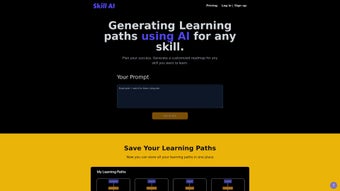

Download Skill AI – Personalized Learning Paths, AI‑Powered Skill Development Tool
Why Skill AI Is Changing the Way We Learn
In a world where new technologies and market demands evolve at lightning speed, staying ahead requires more than just casual reading or sporadic online courses. Skill AI steps in as a web‑based platform that harnesses artificial intelligence to design truly personalized learning roadmaps for anyone eager to acquire or sharpen a skill. Whether you’re a software developer aiming to master a new framework, a marketer looking to dive into data analytics, or a hobbyist hoping to learn photography, Skill AI tailors a step‑by‑step curriculum that aligns with your goals, time constraints, and current proficiency.
The platform does more than suggest resources; it builds a structured pathway, tracks progress, and continuously adapts as you log achievements and milestones. Early access to upcoming functionalities ensures that users are always equipped with the freshest tools, while the clean, intuitive interface makes navigation feel effortless. Although the service is fully online and lacks offline capability, its robust AI engine and user‑centric design make it a compelling choice for modern learners who value efficiency and customization.
Beyond the core learning experience, Skill AI integrates subtle motivational techniques such as streak counters, achievement badges, and personalized nudges that keep learners engaged over long periods. The platform also supports community interaction through optional forums where users can share tips, ask questions, and even collaborate on mini‑projects. This hybrid approach of AI‑driven guidance combined with human‑centric community support sets Skill AI apart from generic MOOC aggregators.
In this review, we’ll explore the core features that set Skill AI apart, walk through the installation and usage process, examine compatibility across devices, weigh the pros and cons, and answer common questions. By the end, you’ll have a clear picture of whether Skill AI is the right addition to your personal development toolkit.
Core Features That Power Personalized Learning
AI‑Generated Learning Paths
At the heart of Skill AI lies its AI‑driven algorithm that translates user inputs—such as desired skill, current level, time availability, and specific career objectives—into a detailed learning itinerary. The system scans a curated database of courses, tutorials, articles, and videos, then ranks them based on relevance, difficulty, and user feedback. This dynamic approach eliminates the guesswork of picking random resources and ensures each step builds logically on the previous one.
Progress Tracking & Milestone Logging
Skill AI provides an interactive dashboard where learners can log completed modules, record test scores, and set milestone goals. The platform visualizes progress through graphs and percentage bars, highlighting areas that need reinforcement. Notifications remind users of upcoming deadlines, while the AI subtly adjusts the roadmap if a learner lags or accelerates, keeping the plan realistic and motivating.
Early Access to New Functionalities
Subscribers receive invitations to beta‑test upcoming features such as community‑driven skill challenges, integration with popular productivity tools (e.g., Notion, Trello), and AI‑generated practice quizzes. This early‑access model not only gives users a competitive edge but also contributes valuable feedback that shapes the platform’s evolution.
Intuitive, Web‑Based Interface
The UI follows modern design principles: clean typography, responsive layout, and a clear navigation hierarchy. Users can filter resources by format (video, article, interactive), difficulty, and cost. A built‑in search bar leverages the same AI engine to answer quick queries like “What’s the best way to learn React Hooks in 2 weeks?” with personalized suggestions.
- AI‑generated, goal‑oriented learning roadmaps
- Customizable progress dashboard with visual analytics
- Beta access to emerging tools and community challenges
- Responsive web design for desktop and mobile browsers
- Resource filtering by format, difficulty, and price
- Secure cloud storage of user data and learning history
Installation, Setup, and Daily Use: A Step‑by‑Step Guide
Getting Started – No Download Required
Skill AI is a cloud‑native solution, meaning there is no traditional software download or installation process. Users simply visit skillai.example.com, create an account with an email address or social login, and verify their email. The registration process takes under two minutes and includes an optional questionnaire that gathers information about the learner’s preferred skill, current expertise, and time commitment.
Creating Your First Learning Path
After logging in, the onboarding wizard asks three key questions: (1) What skill do you want to develop? (2) What is your current proficiency (beginner, intermediate, advanced)? (3) How many hours per week can you dedicate? Based on these answers, the AI instantly generates a roadmap consisting of weekly milestones, recommended resources, and a projected completion date. Users can edit any component—swap a video for an article, adjust the weekly hour allocation, or add personal projects—allowing complete control over the plan.
Tracking Progress and Staying Engaged
Each day, learners can log activities via the “Log Progress” button. The system records the resource used, time spent, and a self‑assessment rating. Over time, the dashboard aggregates this data into trend charts that illustrate learning velocity, knowledge retention, and upcoming gaps. Push notifications (via browser or optional email) remind users of upcoming milestones, while the AI offers motivational nudges when a user falls behind, such as suggesting a shorter micro‑learning video to regain momentum.
Updating the Roadmap
Skill AI’s AI engine continuously monitors the learner’s performance. If a user consistently scores high on quizzes, the platform may accelerate the roadmap, proposing more advanced modules sooner. Conversely, if a learner struggles with a particular concept, the AI inserts supplemental materials and extends the related timeframe. This dynamic adaptation ensures the learning path remains realistic and aligned with actual progress.
Tips for Maximizing Efficiency
To get the most out of Skill AI, schedule dedicated study blocks that align with the suggested weekly hours, use the built‑in timer to track focused sessions, and regularly review the analytics dashboard to identify patterns. Engaging with the community forums can also surface alternative resources that the AI may not have initially highlighted, enriching the overall learning experience.
Compatibility, System Requirements, and Technical Considerations
Skill AI runs entirely in a web browser, making it compatible with any modern operating system that supports HTML5, CSS3, and JavaScript. This includes Windows 10/11, macOS Ventura and later, Linux distributions with up‑to‑date browsers, as well as mobile platforms like Android 8.0+ and iOS 13+. Because the service is cloud‑based, there is no need for local storage or heavy CPU usage, allowing seamless performance even on older hardware.
Browser Recommendations
For the best experience, use the latest versions of Chrome, Edge, Firefox, or Safari. These browsers fully support the platform’s responsive design, real‑time data visualizations, and push notification APIs. While Skill AI will function on older browsers, users may encounter slower loading times or limited interactivity.
Security and Data Privacy
All data transmission between the user’s device and Skill AI’s servers is encrypted via HTTPS/TLS 1.3. User credentials are stored using salted bcrypt hashing, and personal learning data is saved in a secure, GDPR‑compliant cloud database. The platform offers two‑factor authentication (2FA) for added protection, and users can export or delete their learning history at any time from the account settings.
Limitations to Keep in Mind
Because Skill AI is an online‑only service, an active internet connection is required for every interaction. There is currently no offline mode or downloadable content, which may be a drawback for users with limited bandwidth. Additionally, the platform does not support multi‑user accounts or team collaboration, making it less suitable for corporate training programs that need shared dashboards.
Performance on Low‑End Devices
Even on low‑end laptops or older smartphones, Skill AI remains usable thanks to its lightweight front‑end architecture. The most resource‑intensive operations—such as AI recommendation calculations—are performed server‑side, meaning the client only renders HTML and basic visualizations. Users on constrained connections may experience slightly longer initial load times, but subsequent interactions are fast and responsive.
Pros & Cons, Frequently Asked Questions, and Expert Review
Pros
- Highly personalized AI‑generated learning paths reduce time spent searching for resources.
- Dynamic progress tracking with visual analytics keeps motivation high.
- Early access to beta features keeps users at the forefront of e‑learning trends.
- Responsive web design works across Windows, macOS, Linux, Android, and iOS.
- Secure cloud storage and optional 2FA protect personal data.
- Community forums add a human touch to AI‑driven recommendations.
Cons
- No offline access; a stable internet connection is mandatory.
- Lacks multi‑user or team collaboration features for corporate training.
- AI algorithm details are not disclosed, which may concern privacy‑focused users.
- Pricing tiers are not publicly listed; users must request a quote for premium plans.
- Limited integration options until beta phase is completed.
FAQ – Frequently Asked Questions
Is Skill AI free to use?
Skill AI offers a limited free tier that includes basic AI‑generated roadmaps and progress tracking. Advanced features such as beta access, premium resources, and custom analytics require a paid subscription.
Can I export my learning data?
Yes. Users can download a CSV file containing completed modules, timestamps, and self‑assessment scores from the account settings page.
Does Skill AI integrate with other productivity tools?
Integration is currently in beta. Early adopters can sync their learning milestones with Notion, Trello, and Google Calendar via API connections.
How secure is my personal information?
All data is encrypted in transit (HTTPS/TLS) and at rest. Passwords are hashed with bcrypt, and two‑factor authentication is optional for added security.
What devices can I use to access Skill AI?
Any device with a modern web browser—desktop, laptop, tablet, or smartphone—on Windows, macOS, Linux, Android, or iOS can access Skill AI.
Expert Review Summary
Rating: 4.5/5
Skill AI delivers a compelling blend of AI personalization and intuitive progress tracking that makes self‑directed learning feel organized and purposeful. While the lack of offline mode and team features limit its appeal for enterprise settings, individual professionals and lifelong learners will appreciate the adaptive roadmaps and secure cloud environment. The platform’s commitment to releasing new tools early keeps it fresh, and its cross‑platform accessibility ensures that you can study wherever you are.
Final Verdict and How to Get Started
Overall, Skill AI stands out as a forward‑thinking e‑learning companion that leverages artificial intelligence to cut through the noise of endless online content. Its strength lies in delivering a clear, actionable learning path that evolves with the user, backed by robust progress analytics and a secure, browser‑based experience. If you’re a self‑motivated learner looking for a structured yet flexible roadmap, Skill AI is worth a try—especially the free tier, which lets you experience the core AI functionality without commitment.
The platform’s modern design, responsive performance on both desktop and mobile, and commitment to data security make it a trustworthy choice for anyone serious about skill development. While power users may eventually outgrow the free version and consider a paid plan for premium integrations, the entry point offers enough depth to test whether AI‑driven learning fits your style.
Ready to accelerate your skill development? Sign up for Skill AI today, create your first personalized learning path, and watch your competence grow day by day. Remember, the future favors those who continuously learn, and Skill AI is the tool designed to keep you ahead of the curve.






